What it does for you
Real-time engines darken creases and corners with a cheap screen-space trick called ambient occlusion. raw-native renders a scene with that trick and with a slow ray-traced reference, measures how far apart the two are, and tells you whether the shortcut can be trusted for that view. You get the picture and the evidence in the same run.
- A verdict per viewA JSON certificate says verified when the shortcut's error stays inside the tolerance and refuted when it does not.
- Recheck without trusting it
raw_native_cli verifyrenders nothing. It re-hashes the files and recomputes the error from them. - The same bytes everywhereMSVC, GCC and the WebAssembly build write byte-identical files for the default render.
- No dependenciesC++23 and the standard library. The optional GPU builds are checked frame by frame against this CPU path.
Source: README.md at f2cd6e9 (release 0.5.1)
Watch
No concept film fits this tool closely yet. The walkthrough below covers it in text, with real commands and output.
Video walkthrough: coming with the next release.
How it works, one step at a time
Scroll, or use the step buttons. The renders, certificate values and timings come from the repository at f2cd6e9. The two cross-section drawings are a 2D slice that runs the same rules as the C++ code; their counts belong to the drawing.
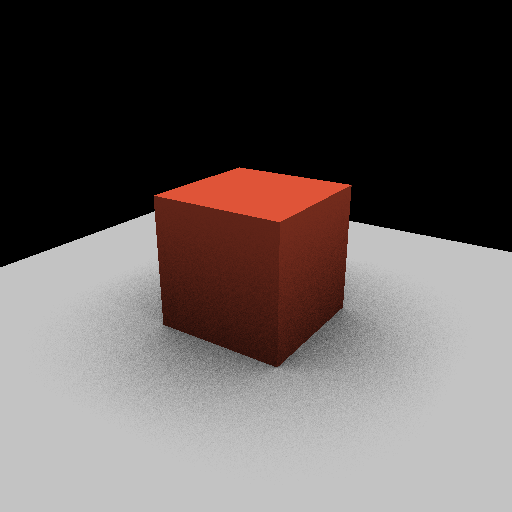
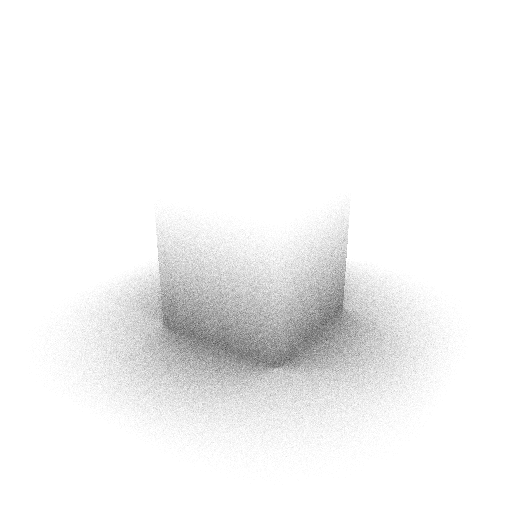
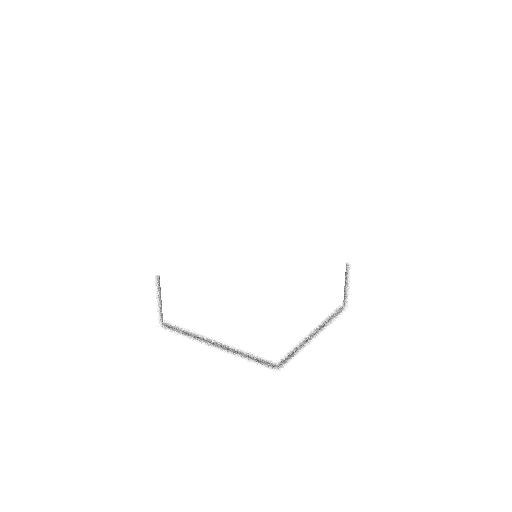
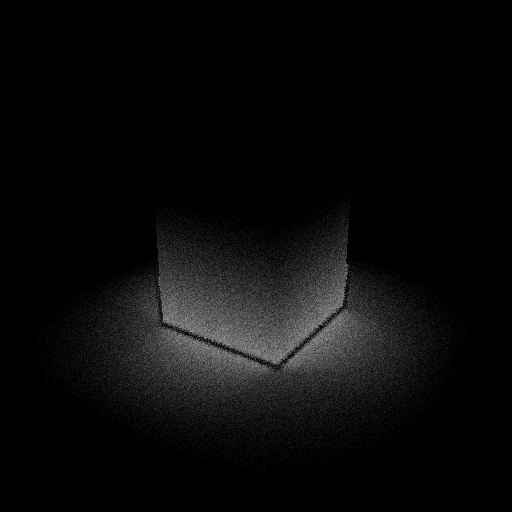
- 01
One run, four pictures, one verdict
Run
raw_native_cli --out ./out --width 512 --height 512and you get the shaded frame, two occlusion maps and the difference between them. The ray-traced map shows dark contact shadows where the box meets the ground. The screen-space map misses most of them.For this default view the error is 0.1349 RMSE against a tolerance of 0.12, so the certificate says refuted. The shortcut is too weak for this camera, and the run says so.
Source: README.md, the default render and its certificate; docs/examples/default-certificate.json
- 02
Rasterize into a G-buffer
The scene is built in: a 10 by 10 ground plane and a box two units tall at the origin, under one directional light. The rasterizer finds the nearest surface for each pixel and stores five channels: depth, normal, world position, motion and a coverage mask.
Both occlusion estimators read this buffer. The mask matters later: only covered pixels are compared.
Source: raw/renderer/gbuffer.hpp, src/scene, src/renderer/render.cpp
- 03
The reference: shoot real rays
For each covered pixel the reference sends 64 rays over the hemisphere above the surface, weighted toward the normal. A ray that hits geometry within 2.0 world units is blocked. The pixel's occlusion value is the share of rays that got out.
The ray directions come from a hash of the pixel and the sample index, with no global random state. Run it twice and you get the same grain.
Source: src/renderer/ray_ao.cpp, constants in raw/renderer/render.hpp
- 04
The shortcut: look only at the screen
The screen-space method takes 24 samples within 6 pixels of the pixel and reads their stored positions. A neighbour within 2.0 units that rises into the hemisphere (its direction scores above 0.15 against the normal) counts as blocking.
It can only see what the camera sees. A face turned away from the camera is not in the buffer, and anything more than 6 pixels away is never sampled. That is why the drawing's two numbers differ.
Source: src/renderer/ssao.cpp
- 05
Reconcile: one number, one bound
The reconcile takes the absolute difference at every covered pixel, keeps the largest, and computes the root mean square. If the RMSE is at or below the tolerance the claim is verified; above it, refuted.
Default view: 151,984 covered pixels, RMSE 0.1349, tolerance 0.12. Refuted. The worst single pixel is off by 0.6406.
Source: src/cert/reconcile.cpp
- 06
The verdict depends on the view
Same scene, same tolerance, five cameras. Two views stay inside the bound: high, looking down from above, and wide. The default, low and close views fall outside it.
A pass on RMSE says nothing about the worst pixel: the high view passes at 0.0827 with a maximum error of 0.625.
Source: README.md, "The verdict depends on the view"; evidence/wasm-vs-native-512.json
- 07
Write it down with its evidence
The certificate records the claim, the verdict, every parameter that changes the pixels, the sample counts, the exact float values and the SHA-256 of every file the verdict was judged from. Since 0.5.0 a
receipt.jsonrestates the same check in the shared superstack receipt format.Source: README.md, "What one run writes" and "The superstack receipt"; docs/examples/default-certificate.json
- 08
Check it without trusting the renderer
raw_native_cli verify ./outrenders nothing. It re-hashes every listed file, recomputes the reconcile from the two float maps and the mask, and compares the pixel count, RMSE, maximum error and verdict with the recorded ones.Exit 0 means every check matches, 3 means a mismatch, 2 means a file is missing.
scripts/recheck.pydoes the same in Python and shares no code with the C++ verifier, so a bug in one shows up as a disagreement. Try each case in the panel.Source: README.md, "Check a certificate without trusting the renderer"; src/tools/verify.cpp
- 09
Render twice to prove the memory bound
The first pass renders inside a generous slab and records exactly how many bytes the frame needed. The second pass renders again inside a budget of exactly that many bytes, with an allocator that never grows. If anything asks for more the second time, the render stops and the memory certificate says refuted.
Source: README.md, "How the memory budget works"; app/main.cpp
- 10
The GPU is checked against the CPU
Two optional builds render the same frame on the GPU, through D3D12 on Windows or WebGPU in a browser, and compare every GPU frame with a CPU render of the same camera. The bounds were committed before the first line of GPU code.
All 16 renders pass on both backends. 13 of 16 are byte-identical to the CPU frame. The other 3 differ by one ray on a few pixels and still pass.
Source: README.md, "Render on the GPU, checked against the CPU"; raw/cert/gpu_tolerance.hpp; evidence/d3d12-rtx4090-checks.json, evidence/webgpu-rtx4090-chromium.json
Walkthrough
Install it, run it once, then use the main feature. Each command below is real, and so is its output.
Get it
Download a binary from the latest release (Windows x64, Linux x64 or WebAssembly) and check it against
SHA256SUMS.First run: render and reconcile
Render the default scene. Both occlusion estimators run, and the reconcile compares them against the tolerance.
$ raw_native_cli --out ./out
reconcile: pixels=37996 rmse=0.1294 maxError=0.6094 verdict=DIVERGENT
Verify the output
Re-check every file the render wrote.
$ raw_native_cli verify ./out
verify: all checks match
Try another view
Change the size and camera.
$ raw_native_cli --out ./high --width 512 --height 512 --eye 0,9,3 --target 0,0.5,0Or build from source
CMake 3.24 or newer and a C++23 compiler.
$ cmake -S . -B build -DCMAKE_BUILD_TYPE=Release
$ cmake --build build --config Release
$ ctest --test-dir build -C Release --output-on-failure
Without size flags the CLI renders 256 x 256, so its numbers differ from the 512 x 512 values above. Output lines are excerpts from raw_native_cli built from f2cd6e9 with MSVC on Windows.
Run it in this page
This loads raw-native 0.4.0's WebAssembly build from harperz9.github.io, checks both files against their SHA-256 before running them, and renders on your CPU. The CPU render code is unchanged from 0.3.0 through 0.5.1. Smaller frames give different numbers from the 512 x 512 table above. At 256 x 256 the default view matches the native CLI run shown above: rmse 0.1294 over 37,996 pixels.
What it does not do
- There is one built-in test scene: a box on a ground plane under one light. There is no model loader yet.
- The reference is an estimate. 64 hemisphere samples per pixel give a repeatable answer with visible grain, and it is the bar the shortcut is held to.
- The screen-space method is a simple one. Most views come back refuted, which is the check reporting a weak shortcut.
- RMSE summarises the whole frame. A verified view can still have single pixels far off.
- Byte-identical output was checked on x86-64 with two compilers and on WebAssembly. Other CPU architectures are untested.
- The GPU timings and checks come from one machine, one GPU and one driver. Another adapter may differ.
Source: README.md, "Limits, stated plainly" and "Measured results", at f2cd6e9
Check what stuck
Answer each one in your head before you open it.
Which of the two occlusion maps is the reference, and why?
The ray-traced one. It tests real rays against the geometry within 2.0 units, so it sees occluders the camera cannot. The screen-space map only reads what is in the G-buffer.
The default view reads refuted. What two numbers decide that?
The RMSE over covered pixels, 0.1349, and the tolerance, 0.12. The RMSE is above the bound.
Why can the high view be verified while one of its pixels is off by 0.625?
The verdict is on RMSE across 239,854 pixels. A few large errors barely move a root mean square, so a pass says nothing about the worst pixel.
What does verify do that a second render would not?
It renders nothing. It re-hashes the recorded files and recomputes the reconcile from them, so it checks the evidence without trusting the renderer that made it.